安装和启动
理解设计
Before everything else it is important to understand that unlike other web frameworks, py4web is not only a python module that can be imported by apps. It is also a program that is in charge of starting some apps. For this reason you need two things:
py4web 模块(您可以从我们的网站、pypi 或 github 下载)
一个或多个文件夹,其中包含你要运行的应用程序集合。
py4web 有命令行选项,可以创建一个包含一些示例应用程序的文件夹,或初始化一个现有文件夹,并将 scaffolding 应用程序添加到那个文件夹中。安装后,您可以在同一文件夹下同时运行多个应用程序,并由同一地址和端口的同一 py4web 进程提供服务。 那个 apps 文件夹是一个 python 模块,里面的每个应用程序也是一个 python 模块。
支持的平台和先决条件
py4web 在 Windows、MacOS 和 Linux 上运行良好。它的唯一先决条件是使用 Python 3.7+,必须提前安装(除非您使用 py4web 的二进制文件)。
安装步骤
有四种安装 py4web 的替代方法,我们将指导您完成每种方法,如果您遇到困难,请 联系我们 。
使用虚拟环境从 pip 安装
任何像 py4web 这样复杂的 python 应用程序的完整安装肯定会修改您系统的 python 环境。为了防止任何不必要的更改,使用 python 虚拟环境(也称为 virtualenv ,请参阅 here 的介绍)是一个好习惯。这是一个标准的 python 特性;如果你还不知道 virtualenv,现在是开始发现它的好时机!
以下是创建虚拟环境、激活它以及在其中安装 py4web 的说明:
python3 -m venv venv
. venv/bin/activate
python -m pip install --upgrade py4web --no-cache-dir
py4web setup apps
py4web set_password
py4web run apps
无论是否使用 python py4web 的虚拟环境,启动 py4web 运行应用程序都是一样的
run cmd.exe
In e.g. folder c:\py4web
python3 -m venv venv
"C:\py4web\venv\Scripts\activate.bat"
python -m pip install --upgrade py4web --no-cache-dir
cd venv\scripts
py4web.exe setup apps
py4web.exe set_password
py4web.exe run apps
您还可以在同一文件夹中找到 power shell 脚本。无论是否使用 python py4web 的虚拟环境,启动 py4web 运行应用程序都是一样的
不使用虚拟环境,从 pip 安装
pip 是 py4web 的基本安装程序,它将快速安装 py4web 的最新稳定版本。
在命令行
python3 -m pip install --upgrade py4web --no-cache-dir --user
此外,如果 python3 不起作用,尝试指定一个完整的版本,例如 python3.8 。
这将仅在系统路径上安装 py4web 及其所有依赖项。名为 assets 的文件夹(它包含 py4web 的系统应用程序 )也将被创建。安装后,您将能够在任何给定的工作文件夹上启动 py4web :
py4web setup apps
py4web set_password
py4web run apps
如果 py4web 命令未被接受,则表示它不在系统路径中。在 Windows 上,pip 将在系统路径上创建一个特殊的 py4web.exe 文件(指向 py4web.py),但如果你错误地使用了 –user 选项,就不会创建这个文件。在这种情况下,你可以通过以下方式运行所需的命令:
python3 py4web.py setup apps
python3 py4web.py set_password
python3 py4web.py run apps
从源代码安装(全局)
这是安装程序的传统方式,但它仅适用于 Linux 和 MacOS( Windows 通常不支持 make 实用程序)。所有要求都将安装在系统的路径上,并链接到本地文件夹上的 py4web.py 程序。
git clone https://github.com/web2py/py4web.git
cd py4web
make assets
make test
python -m pip install .
py4web setup apps
py4web set_password
py4web run apps
另请注意,以这种方式安装时, py4web/assets 文件夹的内容起初是缺失的,但稍后可以使用 make assets 命令手动创建它。
Notice that you can also (and should) install py4web from source inside a virtual environment.
从源代码直接运行
通过这种方式,所有需求都将在系统的路径上安装或升级,但 py4web 本身只会复制到本地文件夹中。如果您已经有一个可用的 py4web 安装,但想测试另一个,这尤其有用。此外,从源代码(本地或全局)安装将安装 py4web 主分支上存在的所有最新更改 -- 因此您将获得最新(但可能未经测试)的代码。
将命令行切换到给定的工作文件夹,然后运行
git clone https://github.com/web2py/py4web.git
cd py4web
python3 -m pip install --upgrade -e .
安装后,您应该始终从那里开始:
./py4web.py setup apps
./py4web.py set_password
./py4web.py run apps
如果您已在全局和本地安装了 py4web ,请注意 ./ ;它强制运行本地文件夹的 py4web 版本,而不是全局安装的版本。
python3 py4web.py setup apps
python3 py4web.py set_password
python3 py4web.py run apps
在 Windows 上,本地文件夹中的程序总是在系统路径设置中的程序之前被执行(因此在 Linux 上不需要 ./ )。但是直接运行 .py 文件是不常见的,你需要一个显式的 python3/python 命令。
从二进制文件安装
这不是一个真正的安装,因为你只需复制系统上的一堆文件,而无需对其进行任何修改。因此,这是最简单的解决方案,特别是对于初学者或学生来说,因为它不需要在您的系统上预先安装 Python ,也不需要管理权限。另一方面,它是实验性的,它可能包含一个旧的 py4web 版本,DAL 支持有限,很难添加其他功能。
为了使用它,您只需要从 这个外部存储库 下载最新的适用于 Windows 或 MacOS 的 ZIP文件。将其解压缩到本地文件夹中,然后在那里打开命令行。最后运行:
./py4web set_password
./py4web run apps
如果使用 Windows ,请省略 './'
Notice: the binaries may not correspond to the latest master or the latest stable branch of py4web although we do our best to keep them up to date.
升级
If you installed py4web from pip you can simply upgrade it with
python3 -m pip install --upgrade py4web
警告
这不会自动地升级标准应用,如 Dashboard 和 Default 。你需要手动删除这些应用,然后运行:
py4web setup <path to apps_folder>
来重新安装他们。这是一种安全措施,以防万一你对那些应用做了更改。
如果你是通过其它方式安装的 py4web ,那么你必须手动升级它。首先,你需要备份所有已完成的个人 py4web 工作内容,然后删除旧的安装文件夹,再重新安装 py4web 框架。
使用 uv 运行
这是管理 python 包的最新方法。按 https://docs.astral.sh/uv/getting-started/installation/ 所示安装 uv,然后运行:
uv run py4web.py run apps
提供的 Makefile 中有更多 uv 命令示例
首次运行
使用前面任何一种方法运行 py4web ,都将生成像这样的输出:
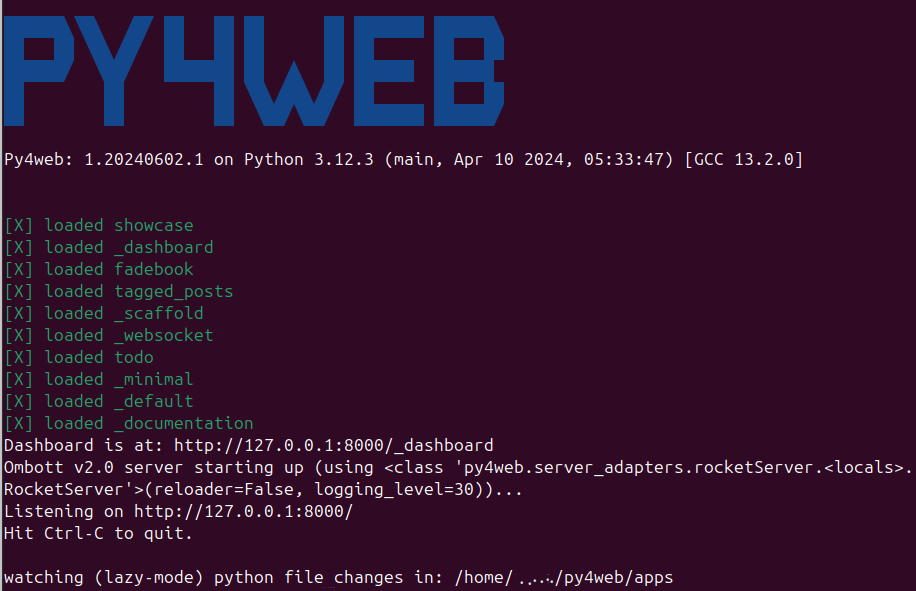
Generally apps is the name of the folder where you keep all your
apps, and can be explicitly set with the run command.
(Yet nothing prevents you from grouping apps in multiple folders with
different names.) If that
folder does not exist, it is created. PY4WEB expects to find at least
two apps in this folder: Dashboard (_dashboard) and Default
(_default). If it does not find them, it installs them.
Dashboard 是一个基于 web 的 IDE。下一章会详细描述它。
Default 是一个仅有 “欢迎用户访问” 的 web 应用。
备注
有些应用 - 如 Dashboard 和 Default - 在 py4web 中有特殊的角色,因此它们的实际名字以 _ 开头,以避免与你自己创建的应用冲突。
一旦 py4web 运行,通过在本地计算机中打开下面的网址你能访问某个特定应用:
http://localhost:8000
http://localhost:8000/_dashboard
http://localhost:8000/{yourappname}/index
要停止 py4web,需要在你运行它的窗口中按 Control-C 。
备注
只有 Default 应用是特殊的,因为它的路径中不需要像其它所有应用中有的 “{appname}/” 前缀。一般来说,你可能希望将 apps/_default 符号链接到你的默认应用程序
对于所有应用来说,末尾的 /index 也是可选的。
警告
对于 Windows: 有可能 Ctrl-C 不能停止 py4web。在这种情况下,尝试使用 Ctrl-Break 或 Ctrl-Fn-Pause 。
命令行选项
py4web 提供了多个命令行选项,可以通过不带任何参数地运行 py4web 而列出它们:
# py4web
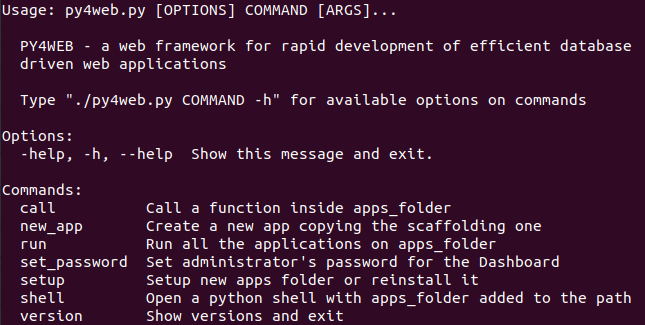
你可以通过带有 –help 或 -h 参数的方式运行 py4web 来获取特定命令行选项的额外帮助。
call 命令行选项
# py4web call -h
Usage: py4web.py call [OPTIONS] APPS_FOLDER FUNC

  Call a function inside apps_folder

Options:
  -Y, --yes          No prompt, assume yes to questions  [default: False]
  --args TEXT        Arguments passed to the program/function  [default: {}]
  -help, -h, --help  Show this message and exit.
例如:
# py4web call apps examples.test.myfunction --args '{"x": 100}'
myfunction 是你想调用的位于 apps/examples/test.py 中的函数。注意,你必须像上面那样使用单引号或双引号来传递参数。
new_app 命令行选项
# py4web new_app -h
Usage: py4web.py new_app [OPTIONS] APPS_FOLDER APP_NAME

  Create a new app copying the scaffolding one

Options:
  -Y, --yes                No prompt, assume yes to questions  [default:
                           False]

  -s, --scaffold_zip TEXT  Path to the zip with the scaffolding app
  -help, -h, --help        Show this message and exit.
目前,无论是通过二进制文件安装还是(在本地)从源代码安装,都会出现错误,因为它们缺少资产压缩文件(asset zip file)。
run 命令行选项
# py4web run -h
Usage: py4web.py run [OPTIONS] APPS_FOLDER

  Run the applications on apps_folder

Options:
   -Y, --yes                       No prompt, assume yes to questions
   -H, --host TEXT                 Host listening IP  [default: 127.0.0.1]
   -P, --port INTEGER              Port number  [default: 8000]
   -A, --app_names TEXT            List of apps to run, comma separated (all if
                                    omitted or empty)
   -p, --password_file TEXT        File for the encrypted password  [default:
                                    password.txt]
   -Q, --quiet                     Suppress server output
   -R, --routes                    Write apps routes to file
   -s, --server [default|wsgiref|tornado|wsgiref+threaded|rocket|waitress|gunicorn|gevent|gunicorn+gevent|gevent+websockets]
                                    Web server to use (unavailable: waitress,
                                    gunicorn, gevent, gunicorn+gevent,
                                    gevent+websockets)
   -w, --number_workers INTEGER    Number of workers  [default: 0]
   -d, --dashboard_mode TEXT       Dashboard mode: demo, readonly, full, none
                                    [default: full]
   --watch [off|sync|lazy]         Watch python changes and reload apps
                                    automatically, modes: off, sync, lazy
                                    [default: lazy]
   --ssl_cert PATH                 SSL certificate file for HTTPS
   --ssl_key PATH                  SSL key file for HTTPS
   --errorlog TEXT                 Where to send error logs
                                    (:stdout|:stderr|tickets_only|{filename})
                                    [default: :stderr]
   -L, --logging_level INTEGER     The log level (0 - 50) [default: 30
                                    (=WARNING)]
   -D, --debug                     Debug switch
   -U, --url_prefix TEXT           Prefix to add to all URLs in and out
   -m, --mode TEXT                 default or development  [default: default]
   -help, -h, --help               Show this message and exit.
app_names 选项让你可以过滤你想要运行哪些特定的应用(用逗号分隔)。如果为空或不存在,那么 APPS_FOLDER 中的所有应用都会被运行。
默认情况下(出于安全原因),py4web 框架只会监听 127.0.0.1,即 localhost。如果你需要从其他机器访问它,必须指定 host 选项,如 py4web run --host 0.0.0.0 apps 。
url_prefix 选项对 py4web 级别上的路由很有用。只要 url_prefix 和端口匹配,它允许将多个版本的 py4web 映射到不同的端口。例如 py4web run --url_prefix=/abracadabra --port 8000 apps 。
By default py4web will automatically reload an application upon any changes to the python files of that application.
The reloading will occur on any first incoming request to the application that has
been changed (lazy-mode). If you prefer an immediate reloading (sync-mode), use
py4web run --watch sync. For production servers, it's better to use py4web run --watch off in order
to avoid unneeded checks (but you will need to restart py4web for activating any change).
备注
--watch 指令只检查 /apps 文件夹下的 python 文件的变化。 标准的 py4web 程序的任何修改总是需要完全重启框架。
当前,默认使用的 web 服务器是 rocketServer,但你可以使用 server 选项来改变这个行为。 Rocket3 是 web2py 使用的多线程 web 服务器,去掉了所有 Python2 的逻辑和依赖。
logging_level 的值在标准的 Python 模块 logging 中定义。默认值是 30(它相当于 WARNING )。其他常见的值有 0(NOTSET)、10(DEBUG)、20(INFO)、40(ERROR)和 50(CRITICAL)。 使用它们,告诉 py4web 你想处理该级别及以上的所有事件。
debug 参数自动将 logging_level 设置为 0,并记录对 fixture 函数的所有调用。它还记录会话何时创建、无效、保存。
set_password 命令行选项
# py4web set_password -h
Usage: py4web.py set_password [OPTIONS]

  Set administrator's password for the Dashboard

Options:
  --password TEXT           Password value (asked if missing)
  -p, --password_file TEXT  File for the encrypted password  [default:
                            password.txt]

  -h, -help, --help         Show this message and exit.
如果 --dashboard_mode 不是 demo 或者 none ,那么 py4web 每次启动时,它会要求你输入一个一次性密码来访问 dashboard 。这很烦人。您可以通过使用以下命令将使用 pdkdf2 哈希过的密码存储在一个文件(默认情况下称为 password.txt )中来避免它。
py4web set_password
除非那个文件被删除,否则它将不再询问密码。您还可以使用自定义文件名:
py4web set_password my_password_file.txt
然后要求 py4web 在运行时重新使用该密码
py4web run -p my_password_file.txt apps
最后,你可以手动创建你自己的文件:
python3 -c "from pydal.validators import CRYPT; open('password.txt','w').write(str(CRYPT()(input('password:'))[0]))"
password: *****
setup 命令行
# py4web setup -h
Usage: py4web.py setup [OPTIONS] APPS_FOLDER

  Setup new apps folder or reinstall it

Options:
  -Y, --yes          No prompt, assume yes to questions  [default: False]
  -help, -h, --help  Show this message and exit.
This option creates a new apps folder (or reinstall it). If needed, it will ask for the confirmation of the new folder’s creation and then for copying every standard py4web apps from the assets folder. It currently does nothing on binaries installations and from source installation (locally) - for them you can manually copy the existing apps folder to the new one.
shell 命令行选项
# py4web shell -h
Usage: py4web.py shell [OPTIONS] APPS_FOLDER

  Open a python shell with apps_folder's parent added to the path

Options:
  -Y, --yes          No prompt, assume yes to questions  [default: False]
  -h, -help, --help  Show this message and exit.
Py4web 的 shell 只是常规的 python shell ,只是在搜索路径中添加了应用程序路径。请注意,shell 适用于所有应用程序,而不是单个应用程序。然后,您可以从需要访问的应用程序中导入所需的模块。
例如,在一个 shell 里,你可以:
from apps.myapp import db
from py4web import Session, Cache, Translator, DAL, Field
from py4web.utils.auth import Auth
version 命令行选项
# py4web version -h
Usage: py4web.py version [OPTIONS]

  Show versions and exit

Options:
  -a, --all          List version of all modules
  -h, -help, --help  Show this message and exit.
使用 -all 选项,你将获取所有可用的 python 模块的版本,
特殊情况地安装
在某些特殊情况下,您不能或不想使用我们已经描述过的通用安装说明之一。py4web 存储库中有一个名为 deployment_tools 的特殊文件夹,用于收集一些特殊方法。这里简要介绍了它们,以及一些提示和技巧。
HTTPS
要将 https 与内置 web 服务器(Rocket3)一起使用,请执行以下步骤:
Generate the localhost certificates. For example follow the instructions here:
重新启动浏览器并以安全的方式浏览您的网站。
如果你使用 VS Code 运行 py4web ,您可能需要包含以下内容来更新 py4web 的 launch.json 文件内容:
"configurations": [
        {
            "name": "py4web",
            "type": "debugpy",
            "request": "launch",
            "module": "py4web",
            // or "program": "${workspaceFolder}/py4web.py", if you didn't install py4web as a package
            "args": [
                "run",
                "apps",
                "--ssl_cert", "/path_to/localhost.crt",
                "--ssl_key", "/path_to/localhost.key",
                "--server", "rocketServer",
            ]
        }
    ]
注意,/path_to/ 应该是证书位置的绝对路径。
WSGI
py4web is a standard WSGI application. So, if a full program installation is not feasible you can simply run py4web as a WSGI app. For example, using gunicorn-cli, create a python file:
# py4web_wsgi.py
from py4web.core import wsgi
application = wsgi(apps_folder="apps")
然后,使用 cli 启用应用程序:
gunicorn -w 4 py4web_wsgi:application
wsgi 函数接收与命令行参数同名的参数。
在 GCloud(又名 GAE - 谷歌应用引擎)上部署
登录 Gcloud console 控制台并创建新项目。您将获得一个看起来像 “{project_name}-{number}” 的项目 ID。
在本地文件系统中,创建一个新的工作文件夹并将工作目录切换到那里:
mkdir gae
cd gae
从 py4web 复制示例文件(假设您有来自 github 的源代码)
cp /path/to/py4web/development_tools/gcloud/* ./
将您的 apps 文件夹复制或创建符号链接到 gae 文件夹中,或者也可以新建一个 apps 文件夹,在其中放入一个空的 __init__.py 文件,然后为你想要部署的各个应用创建符号链接。你应该会看到以下文件/文件夹:
Makefile
apps
  __init__.py
  ... your apps ...
lib
app.yaml
main.py
安装 Google SDK 、py4web 并设置工作文件夹:
make install-gcloud-linux
make setup
gcloud config set {your email}
gcloud config set {project id}
(将 {your email} 替换为您的谷歌电子邮件帐户,将 {project id} 替换为从谷歌获得的项目 id )。
现在,每次您想部署应用程序时,只需执行以下操作:
make deploy
您可能希望自定义 Makefile 和 app.yaml 以满足您的需求。您不需要编辑 main.py 。
在 PythonAnywhere.com 上部署
观看 YouTube video 并按照 detailed tutorial 进行操作。bottle_app.py 脚本位于 py4web/deployment_tools/pythonanywhere.com/bottle_app.py 中
在 Docker/Podman 上部署
在 deployment_tools/docker 上,有一个简单的 Dockerfile 用于快速运行 py4web 容器。还有一个 docker-compose.yml 文件,用于在 PostgreSQL 中设置更复杂的多容器。可以从该存储库克隆基于 Scaffold 应用程序的现成 docker 示例 <https://github.com/macneiln/docker-py4web-scaffold> 。
Note that you can use them also with Podman, which has the advantage of not requiring sudo and does not running any background daemon.
在 Ubuntu 上部署
在 deployment_tools/ubuntu 上,有一个使用 buntu Server 20.04.03 LTS 测试过的 bash 脚本。它使用 nginx 和自签名证书。它也可以选择管理 iptables。